iPhone users shouldn't get all the ClearView CRM Mobile benefits, should they? We think not. That's why the mobile app is now available for your Android smartphone.
As with the iOS version, ClearView CRM Mobile for Android is free for ClearView users in the cloud. Just visit the Google Play store for your download.
If you're an Android device owner and had the chance to view the SofTrek's special webinar on Mobile for iOS, you should know that using the app on Android is a nearly identical process. If you didn't see the webinar, you can view it for free at your convenience.
If you're a frontline fundraiser, in many respects ClearView CRM Mobile makes your PC or laptop obsolete. Remember, below is a high-level view of everything you can do in Mobile:
- Work
with your prospects. You can create and track
opportunities, capture meeting notes with your phone's voice-text tools
and prep for meetings.
- Stay
connected with your key donors. You can make calls or email
from right in the app, update donor data when you learn new info,
and import that info to your device contacts file.
- Quickly
handle tasks like creating and tracking actions
to take, sending notifications to colleagues, and capturing and connecting
pictures to donor files.
If
your nonprofit uses ClearView CRM in the cloud, you can go mobile. Ask your organization's
ClearView administrator to configure your system. Once the configuration is complete,
visit Google Play, download, and you're ready for the road.
If you're a frontline fundraiser who's often on the road, you have a powerful new ally in the mobile version of ClearView CRM, available for iPhones and iPads.
Anyone who spends a lot of time on the go knows that being efficient and effective can be a real challenge. That's why ClearView CRM Mobile helps with the kinds of activities that are keys to fundraising success. With the new mobile app, you can:
- work
with prospects by creating and tracking
opportunities, capturing meeting notes with their phones’ voice-text tools
and prepping for meetings.
- stay
connected with donors by making calls or emailing
directly from the app, updating donor data as soon as they learn new info,
and importing donor info to a device contacts file.
- immediately
handle tasks like creating and tracking actions
to take, sending notifications to colleagues, and capturing and connecting
pictures to donor files.
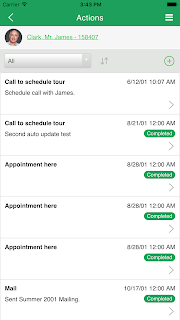 The app offers even more support for your out-of-office solicitation
efforts. For instance, you can easily plan your strategies for those
all-important prospect meetings right from within ClearView CRM Mobile.
The app offers even more support for your out-of-office solicitation
efforts. For instance, you can easily plan your strategies for those
all-important prospect meetings right from within ClearView CRM Mobile.
If you're already using ClearView CRM in the cloud and have an Apple device, you can go mobile. Your first step is asking your organization's ClearView administrator to configure your system, which is a quick and straightforward process. Once the configuration is complete, simply visit the iTunes app store, and download ClearView CRM.


